Product Subscriptions
Subscriptions allow you to achieve that elusive goal of recurring revenue for your business with ease - Reserve It is special because payments happen automatically each month, instead of requiring clients to make manual payments after receiving an invoice (the current status quo in South Africa). This helps to improve retention and results in more reliable monthly revenue.
We have two different types of subscription offerings: Product Subscriptions and Memberships
In this document we'll discuss how to set up Product Subscriptions
1. Select "Settings" from the sidebar menu
2. Select "Products" from the submenu
3. Click on the "New Product" button at the top right of your screen
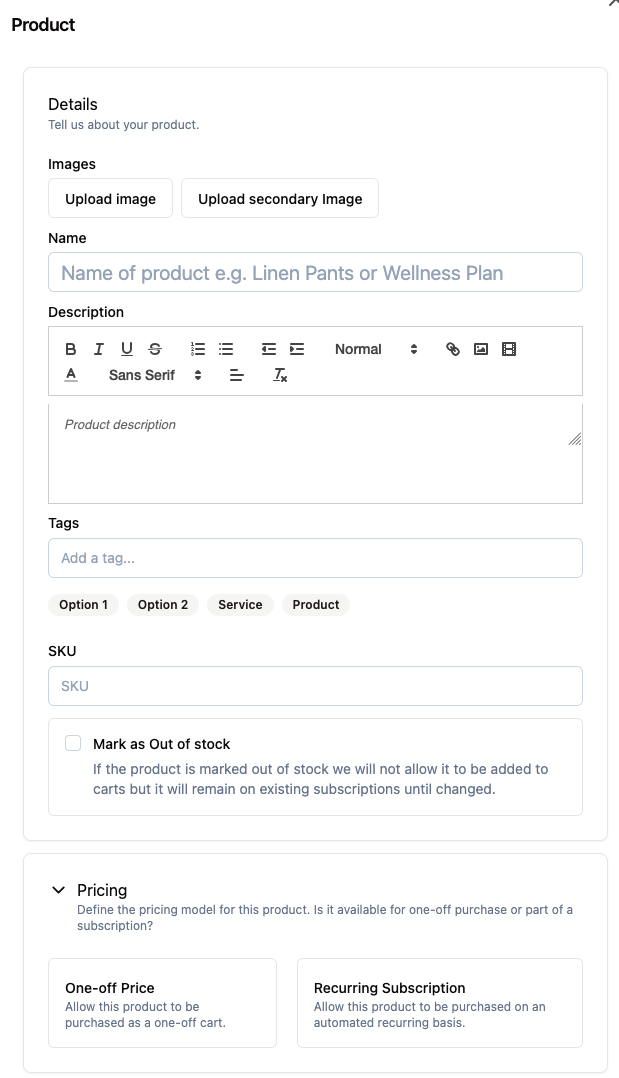
4. Fill out the Product form:
-
Details
-
Thumbnail: upload an image of your product
-
Name: Provide the name of your product
-
Description: Tell us more about your product. You can adjust fonts, upload pictures, add links, and add videos in this section
Pricing
- Select a pricing model option: Once-off payment or Recurring Subscription
- Input the price
- If you've chosen Subscription Pricing, input the price and frequency of payment
Shipping
- Toggle whether your product is a shippable product or not
- If your product is shippable, input the weight (in kg) and dimensions (in cm)
After purchase actions
- You can choose to create a Service Voucher or a BobGo Order after your client has made a purchase
5. Hit "Save"
Congratulations! You have added a Product Subscription to your listing page and your clients are now able to sign up and pay for it